
Features
- No phoning to check if we received your order!
- We update resident names on the form for you
- View order history & just click to re-order
- Immediate confirmation of your order
Step by Step Video
Step 1
Go to the webpage orders.nappyclinic.co.za
Step 2
Type in your username and password and click Sign In
Step 3
Start typing in the name of the resident you want to order for.
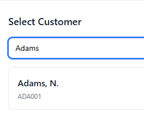
Click on their name. You will see their name and order history.
Step 4
Click on the product you wish to order & change the quantity you require e.g. 4. You can also search for new products to order in the center.

Type in a PO number if you wish to:

Step 5
Now press Submit to send the order through to us.

Completed!
A confirmation will pop up to let you know that we have received the order.